Hiding Inputs of User-Defined FBs
You can hide the inputs of a user-defined function block when calling the function block in FBD/LD and NOLD worksheets. Hidden formal parameters are not visible in the graphical code worksheet in which the FB is used. Each hidden input can be assigned a default constant value when calling the FB in the code worksheet using the parameters editor (see procedure below).
Observe the following:
- The hidden property can only be configured for input formal parameters of user-defined function blocks (i.e., the function block's input variable must have the 'Usage' = 'Input').
- The hidden property is not available in safety-related POUs.
Proceed as follows to define whether a function block input is to be hidden or visible when calling the FB:
- Open the 'Variables' table of the user-defined function block.
- For the input variable of the FB ('Usage' = 'Input'), check the 'Hidden' checkbox to hide the input in the code worksheet where it is used or uncheck it to display the FB input.
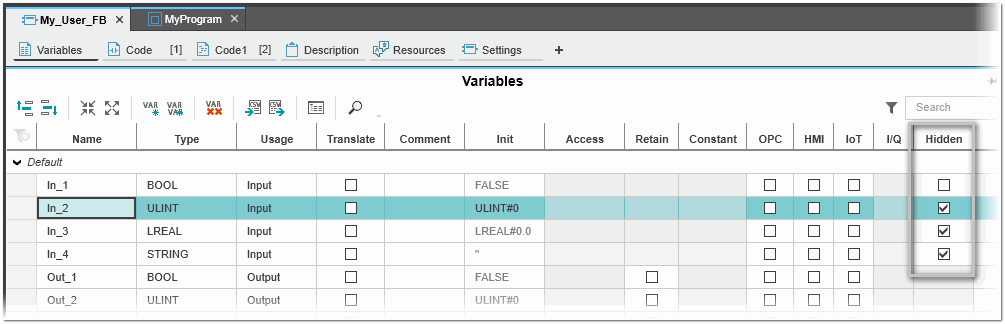
- Optional: Assign a default constant value to an hidden input.
Open the code worksheet where the user-defined FB is used and select the FB. The parameters editor is displayed on the right of the code editor (the editor is only displayed if a user-defined FB with at least one hidden input is selected in the worksheet).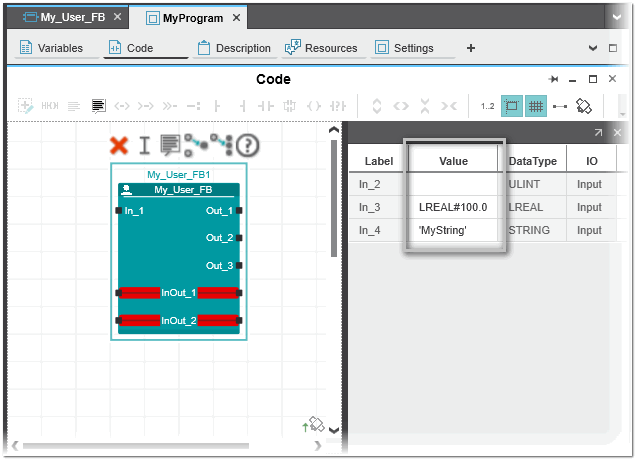
- In the 'Value' column enter the desired constant value (the value must be of the type declared for the input variable).