| 0000 | State name: IdleThe function block is not activated. The Activate input is FALSE.
Output values:
» Ready = FALSE
» FSoE_Diag_Status = 0x0000
» Error = FALSE
» DiagCode = 0x0000 | Activate the function block by switching Activate to TRUE. |
| 8001 | State name: InitThe FB verifies the following:
- No F-diagnostic variables are parameterized in the Safety PLC.
- No other instance of the same FB has already been initialized in the project.
The FB can only be successfully initialized if both checks are successful.
Output values:
» Ready = TRUE
» FSoE_Diag_Status = 0x0000
» Error = FALSE
» DiagCode = 0x8001 | No measures required after successful initialization.If the initialization fails:
- Check the application program and the configuration of the Safety PLC.
- Correct/modify accordingly.
- Rebuild the project in PLCnext Engineer.
- Write the modified project to the controller and perform a restart.
|
| 8000 | State name: SuccessThe FB is active.
Output values:
» Ready = TRUE
» FSoE_Diag_Status = interface data (OUT)
» Error = FALSE
» DiagCode = 0x8000 | If this is an intended event, no measures are required.If this is an unintentional event:
- Check the application program and the configuration of the Safety PLC.
- Correct/modify accordingly.
- Rebuild the project in PLCnext Engineer.
- Write the modified project to the controller and perform a restart.
|
| C002 | State name: Error double instanceInvalid FB configuration: An instance of the same FB has already been created or activated.
Output values:
» Ready = TRUE
» FSoE_Diag_Status = 0x0000
» Error = TRUE
» DiagCode = 0xC002 |
- Check the application program with regard to other FB instance.
- Correct/modify accordingly.
- Rebuild the project in PLCnext Engineer.
- Write the modified project to the controller and perform a restart.
|
| C003 | State name: Error OA_C activeThis error can have the following causes:
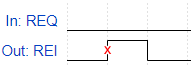
- After the activation of the FB, a rising edge was detected at input FSoE_Diag_Control in bit 0 (OA_C), although no acknowledgement was requested in output FSoE_Diag_Status in bit 0 (OA_Req_S).
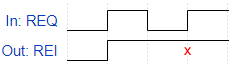
- At input FSoE_Diag_Control, bit 0 (OA_C) was not reset after acknowledgement, and a new acknowledgement was requested via output FSoE_Diag_Status in bit 0 (OA_Req_S).
Output values:
» Ready = TRUE
» FSoE_Diag_Status = 0x0000
» Error = TRUE
» DiagCode = 0xC003 |
- Check the application program.
- Correct/modify accordingly.
- Rebuild the project in PLCnext Engineer.
- Write the modified project to the controller and perform a restart.
|
| C005 | State name: Error Diag variables activeF-diagnostic variables are parameterized in the Safety PLC.
Output values:
» Ready = TRUE
» FSoE_Diag_Status = 0x0000
» Error = TRUE
» DiagCode = 0xC005 |
- Check the application program.
- Correct/modify accordingly.
- Rebuild the project in PLCnext Engineer.
- Write the modified project to the controller and perform a restart.
|
| C006 | State name: Error Write outputInternal firmware error. In this case, the firmware of the Safety PLC assumes the fail-safe state.
Output values:
» Ready = TRUE
» FSoE_Diag_Status = 0x0000
» Error = TRUE
» DiagCode = 0xC006 | Refer to the error reported in PLCnext Engineer. The error log of the Safety PLC can be read out and displayed in the Safety Cockpit. |
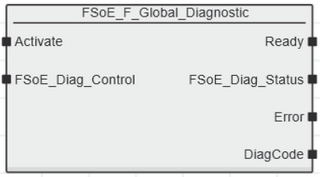
 Activate