Assigning UDT members to Process Data Items
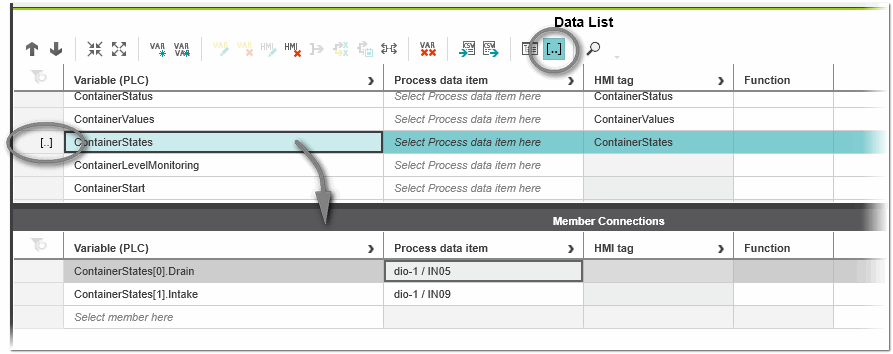
The assignment of elements and members of user-defined data types (ARRAYs and STRUCTs) to process data items (I/O terminals) in a Data List is done using the 'Member Connections' editor. The editor is a subeditor of the Data List editor. You open the editor by pressing the  button on the Data List toolbar or selecting the context menu item 'Show Member Connections' in the Data List.
| Note
The 'Member Connections' editor is only available for Data List editors with leading role 'Variable' ('Variables' column is the first column in the Data List). |
The 'Member Connections' editor behaves like the 'Data List' editor. Assigning an UDT member to a process data item is done by selecting a member of the UDT in the 'Select member here' cell and then selecting a process data item in the 'Process data item' column. If there is at least one member connection defined for the UDT, this is shown by the indicator "[..]" in the variables row in the 'Data List' editor (as shown in the following example).
The subeditor provides a context menu offering commands to edit the content. The available commands work in the same way as in the 'Data List' editor.
| Note
When disconnecting process data items in the subeditor, unconnected elements and members are not removed automatically. They have to be deleted manually. |