Configuring the Update Process of the Controller
| Note
The update process feature is available for PLCnext Technology targets with a firmware version 2026.6 or newer. |
| Further Info
Please also refer to the PLCnext Info Center for details on updating the firmware and automation projects for PLCnext Technology targets. |
By default, when performing an update (e.g., a controller firmware update, an update of the automation project on the controller, or an update of the PLCnext apps on the controller via the WBM or similar), the update function stops and restarts the application without waiting for the status of the controller application. This means, the update is performed without the application being prompted or informed (i.e., the application is stopped at any given time, the update is performed, and then the application is restarted).
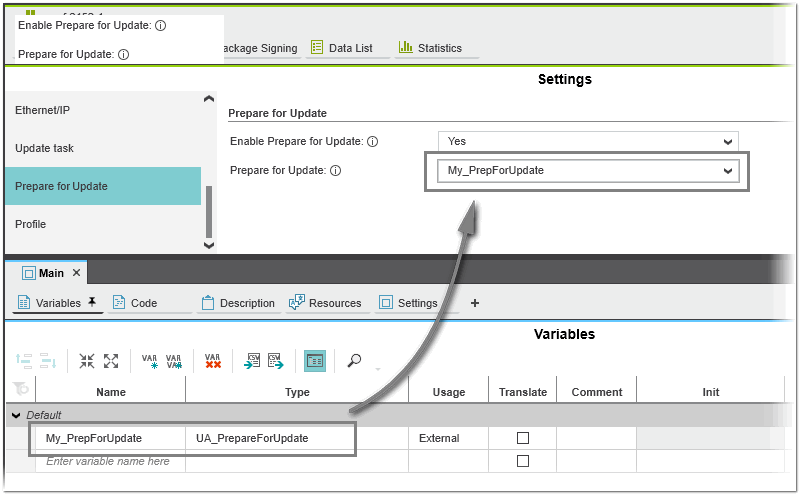
This default behavior can be changed by setting the properties under the 'Prepare for Update' category of the controller's 'Settings' editor (see figure below). Selecting 'Yes' in the 'Enable Prepare for Update' drop-down list (set to 'No' by default) enables the update process function. When enabled, synchronization occurs between the stop/start request of the update component (firmware, application project, etc.) and the controller application. The update process waits until the application has been informed by a Prepare request. Once the controller application has completed its preparations (the application has stopped its tasks and is ready for an update), it informs the update component about the new state. Then the update component stops the controller and the update process can be performed. When the update process is completed, the application resumes with the tasks it stopped during preparation and informs the update component about its new state.
The coupling between the update component and the controller application is implemented by the structure UA_PrepareForUpdate (the structure definition is provided by default for PLCnext Technology targets with a firmware version of 2026.6 or newer). To access the structure, you have to declare a variable of type UA_PrepareForUpdate in your project and then select this variable in the 'Prepare for Update' drop-down list as shown (the drop-down list contains only variables that are of type UA_PrepareForUpdate).
If, for example, a firmware update is requested, the firmware evaluates this variable and then triggers the update process depending on the evaluation result. (How the evaluation is performed depends on the controller application.)
UA_PrepareForUpdate structure
The UA_PrepareForUpdate structure contains the following members:
| Member | Description |
|---|---|
| Request | Requested action to perform (can only be set by the update component). Possible values:
|
| State | Current state of the controller application (can only be set by the application).
|
| Status | Message from the application about the current status. This could be, for example, information about the current preparation step or an error message. |