Diagnostic FSoE system variables - Enabling the Creation
FSoE system variables for FSoE communication/device monitoring
In a safety-related application, the safety-related communication and the operational state of safety-related devices should be monitored. This enables the Safety PLC to determine the state of the functional safety system.
For that purpose, system variables are provided which report- the status of the safety-related communication between the FSoE master (Safety PLC) and the FSoE slaves.
- the operational state and condition of the configured FSoE devices.
In PLCnext Engineer, such diagnostic system variables should be evaluated in the application program, e.g., by programming an edge detection which reacts on the toggling of the Boolean values.
| Further Info
Refer to the help topic "FSoE Communication/Device State Diagnostics" for further details on these variables. The topic describes, among other things, which system variables can be used for monitoring the FSoE communication and which for the status of FSoE slaves. For a detailed description of all available FSoE system variables, refer to the respective controller or FSoE device user manual. |
The creation of these system variables can be enabled/disabled in PLCnext Engineer as described below.
Enabling the creation of system variables
For each diagnostic FSoE system variable provided by the Safety PLC, you can determine whether the variable is to be created in PLCnext Engineer or not. This allows you to limit the number of available system variables in the Safety PLC Data List according to your requirements.
Proceed as follows:- In the PLANT, double-click the 'Safety PLC' node and open the 'Settings' editor.There are two categories for variables that can be created:
- FSoE - device diagnostic variables
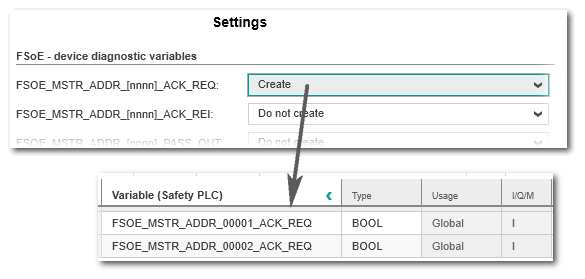
Available for each configured FSoE slave. These device-related system variables contain the slave address (nnnn) of the affected device in the variable name: FSOE_MSTR_ADDR_[nnnn]_*.When you set the value 'Create' for a variable, it will be added to the Safety PLC Data List for each slave. - FSoE - summarizing diagnostic variables
Global system variables for FSoE slaves which summarize all configured FSoE slaves. A global system variable is set to TRUE, if the respective condition applies to at least one configured FSoE slave. The error remains until all slaves reset their error state. Via the global variable, all slave errors can be acknowledged at once.
- FSoE - device diagnostic variables
- In each category, set any variable which you want to use for monitoring and evaluation purposes in your application to the value 'Create'.
Example: The safety application contains two FSoE slaves. The global system variable set to the value 'Create' is available for each slave in the Safety PLC Data List: