Reading Axioline F I/O Devices connected to the local Axioline F Bus
| Note
For the network scan, it is not necessary to manually establish a communication connection before the scan. This is done automatically by PLCnext Engineer. |
- Right-click the 'Axioline F' node in the PLANT and select 'Read Axioline F devices' from the context menu.
- If a scanned device cannot be uniquely identified via its part number, the 'Station structure preview' dialog appears. In the dialog, select the 'Type' of the scanned device from the drop-down list and confirm.
The found devices are inserted in the PLANT under the 'Axioline F' node as well as in the tabular 'Device List' editor of the Axioline F controller.
| Note
When scanning the local Axioline F bus, subordinated IO-Link devices behind the IO-Link master are also scanned and added to the project (provided the IODD file of the IO-Link device has been imported and is available in the COMPONENTS area). The found IO-Link devices appear as submodules of the IO-Link master with the corresponding port number preceding the device name in the PLANT and in the 'Submodule List' editor of the IO-Link master. 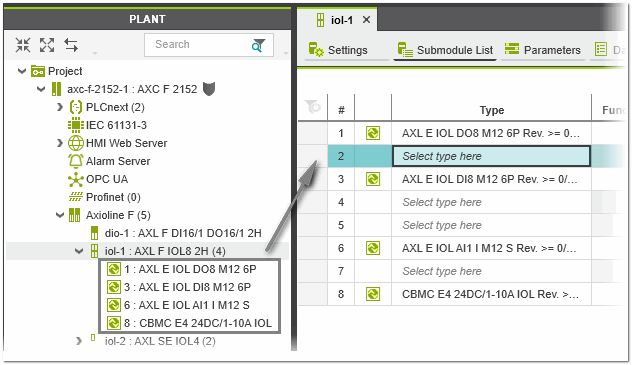 |