Arrays
This topic contains the following sections:
- Overview
- Array size (boundaries) definition with literals and constant variables
- Examples for the declaration and accessing
- Initializing arrays
- Arrays of function blocks
Overview
Arrays are declared in the data type worksheet using a TYPE...END_TYPE declaration block. The array may be multi-dimensional. Array data types consist of several elements of the same data type. Each element can be accessed via its unique element index.
| Note
(Nested) Arrays can also be defined on the 'Variables' and 'Data List' tables in the 'Type' column using the following syntax: ARRAY_<lower_bound>_<upper_bound>_OF_<type>. The type for the array will be automatically created invisibly. The array data type is not available on a datatype worksheet. Examples: ARRAY_0_9_OF_INT (1-dimensional array) ARRAY_0_9_OF_ARRAY_0_5_OF_BYTE (nested array) |
Array size (boundaries) definition with literals and constant variables
The array size (number of elements or values the array can hold) can be defined using either literals (fixed values) or global or local constants. A global constant is created by selecting the 'Constant' attribute for a global variable defined in the variables table/data list. Local constants are declared as VAR CONSTANT in the data type worksheet using a VAR CONSTANT...END_VAR declaration block (see the following example). The initialization value of a constant variable must be a literal (expressions for the initialization value are not supported).

| Note
Local constants can only be used in the same data type worksheet. |
Examples for the declaration and accessing
Example: 1-dimensional array of 10 integers; array size defined using literals
| Data type definition |  |
| Variable declaration ('Variables'/Data List) |  |
| Use in code |  |
Example: 1-dimensional array of 10 integers; array size defined using constant variables
| Data type definition | |
| Variable declaration ('Variables'/Data List) | |
| Use in code | |
Example: 2-dimensional array; declaration using an array of an already declared array
| Data type definition |  |
| Variable declaration ('Variables'/Data List) |  |
| Use in code |  |
| Further Info
See also the topic "User-defined data types". |
Initializing arrays
Arrays, or to be more precise, the individual elements contained in an array, are initialized using the following syntax. The array initializer is a list of comma-separated literals (fixed values) or local or global constants (see above) enclosed by square brackets.

For initializing arrays with a large number of values, so-called repetition numbers can be used.
Example of an initialization in a data types worksheet:

This initialization means the same as:

In the 'Init Value Configuration' editor, these repetition numbers can be entered as initialization statement to initialize arrays.
| Note
If you are using PLCnext Engineer in another user interface language and/or with another Windows system locale than English you must enter numeric values with a '.' as decimal separator (always according to the English standard). This applies, for example, when entering initial values in variables tables or REAL/LREAL literals in the code. |
Arrays of function blocks
An array of function blocks is a collection where each element is its own function block instance. This allows to use N independent copies of the same logic that share the same code but each instance keeps its own internal state. Arrays of function blocks are useful when you have many identical devices or processes, like multiple motors, multiple axes, etc. Instead of declaring separate function block instances of the same function block type, you can declare one array where each element is an FB instance of the same FB type.
Separate function block instances of type MyFB:
MyArray1 : MyFB;
MyArray2 : MyFB;
MyArray3 : MyFB;
...
MyArray11 : MyFB;
Array of function blocks where each element is an instance of type MyFB:
MyArray : ARRAY[0..10] OF MyFB;
Notes on the declaration, initialization, and usage
- The lower bound of the array must always be zero.
- Only function block variables of 'Usage = Input' can be initialized.
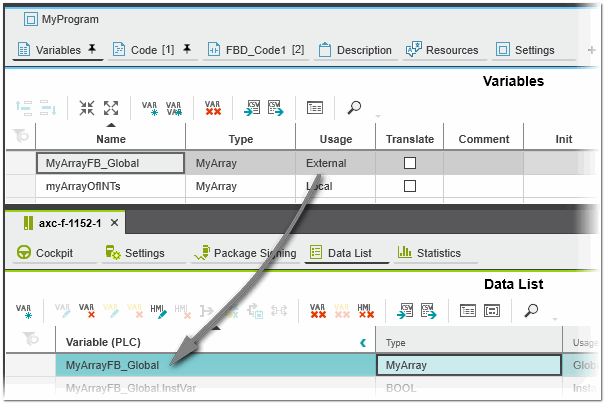
- Global arrays of function blocks are supported. Global function block array variables are automatically created from external variables.
- No ports are created for function block array variables.
- An array of function blocks can use the IN port / OUT port of a program POU.
- Extended identifiers can be used as variable names for arrays of function block instances.
- In the PLANT, the function block array and its instances are shown (different icons are used for instances of global and local arrays of FBs).
-
Namespaces can be defined for arrays of function blocks.
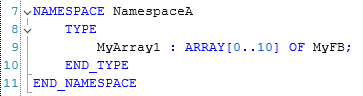
- The maximum array size is 32-bit signed integer.
- Nested arrays of function blocks are not supported.
- Connecting function block array variables is not possible.
- An array of function blocks is not allowed in a STRUCT.
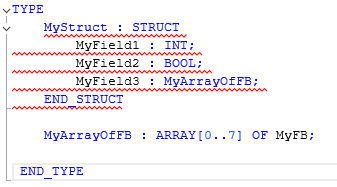
- Arrays of function blocks are not allowed in functions and methods.
- An array of safety-related function blocks is not allowed.
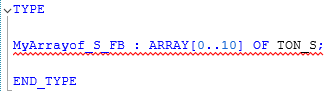
- The assignment of a function block to another function block is not allowed.

- The assignments to read-only variables inside the FB instance are not allowed.

- The assignment of a function block array to another function block array is not allowed.

- Arrays of function blocks containing instance variables are not allowed.
- Only the functions LOWER_BOUND and UPPER_BOUND can be used with arrays of function blocks.
- Online mode:
- Breakpoints can be set in the function blocks and are reached if the function block is used inside an array.
- Overwriting of Input, Output and Local Variables is supported.
- Forcing of variables is not supported.
- In debug mode, the stepping commands (Step into the code, Step over code and Step out of code) are supported.
- Arrays of function blocks can not be added to the WATCHES or LOGIC ANALYZER window.
 Example
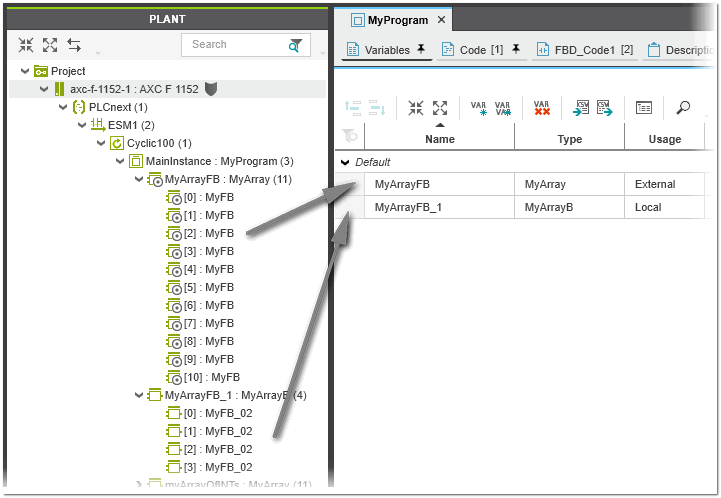
Declaration, initialization, and usage
| Data type definition and initialization | Declaration of user-defined data type:
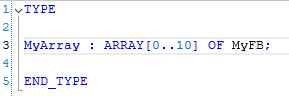 Initialization of user-defined data type:  Elements which are not explicitly initialized are automatically zero-initialized (assigned to zero value). In the example shown, the elements MyArray[3]...MyArray[10] are therefore initialized with 0. |
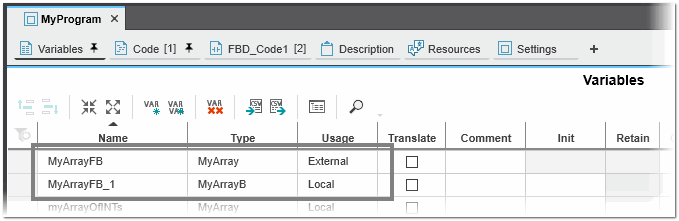
| Declaration and initialization in 'Variables' table / Data List | Declaration in 'Variables' table:
Local ('Usage = Local') and global ('Usage = External') arrays of function blocks
 Initialization using the 'Init Value Configuration' editor: 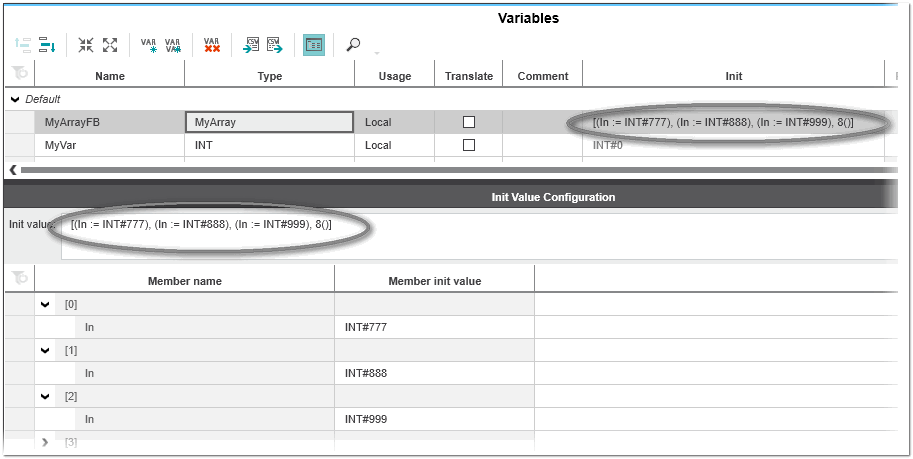 |
| Use in code | Call of an FB instance in ST:
MyArrayFB[3] (In1 := INT#111, In2 := INT#222, Out => MyVarInt);
MyArrayFB[9].In1 := myVar;
MyOutVar := MyArrayFB[0].In1;
FOR index := 0 TO 3 DO MyArrayFB[index](In1 := index, Out => myArrayOfINTs[index]); END_FOR When you type a dot after the array index, the Intellisense will provide the methods of the array function block (e.g., MyArrayFB[3].Method3 will insert Method3 of the function block). var1 := MyArrayFB[3].Method3(123); Call of an FB instance in FBD/LD: 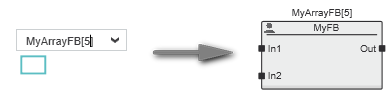 To create a function block in the graphic editor, click into the worksheet, type the name of the instance variable of the array of FBs (e.g., MyArrayFB) followed by the array index enclosed in square brackets and press <Enter>.When you type a dot after the array index, the Intellisense will provide the methods of the array function block (e.g., MyArrayFB[3].Method3 will insert Method3 of the function block). 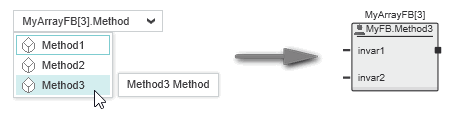 |