'Safety Parameters' Editor
The 'Safety Parameters' editor is available for each FSoE slave node.
 Example: 'Safety Parameters' editor of an FSoE slave input module (subnode of the EtherCAT bus coupler).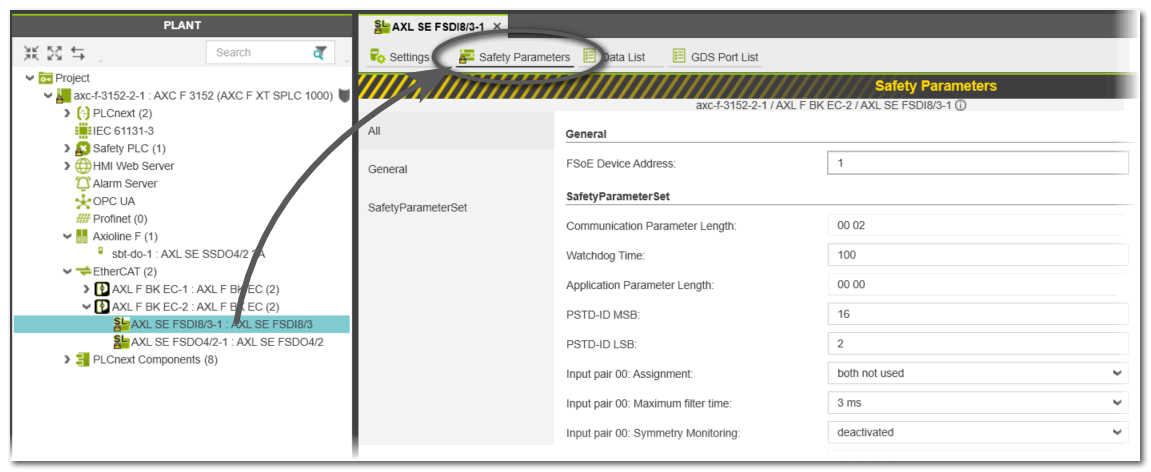
The editor displays the FSoE Device Address. Each FSoE slave has a slave address which is unique within the EtherCAT network. The slave address consists of 16 bits which allow the addressing of a maximum of 65534 slaves (address 0xFFFF is reserved).
When inserting slaves into the PLANT in PLCnext Engineer, this address is assigned automatically. The slave address can be adjusted for each device, for example, by means of a hardware DIP switch or by a configuration editor.
| Note
After modeling the Safety over EtherCAT network in the PLANT, you must make sure that the address set at a slave matches the addressing in PLCnext Engineer. |
Furthermore, the Watchdog Time can be set in the 'Safety Parameters' editor. The watchdog is used to monitor the safety-related FSoE communication. It influences the maximum Safety Function Response Time (SFRT).
Each slave also provides an SafetyParameterSet. Channel-specific parameters may be available for I/O modules. They are used to configure, for example, the timing, symmetry or electrical behavior of the channel or set up a startup/restart inhibit.
| Further Info
For detailed information on the parameter meanings refer to the related slave device manual. |
| Note
The 'Safety Parameters' editor provides an export/import function. |