Configuring CoE Data - CoE Object Dictionary
This topic contains the following sections:
The 'CoE Data' editor is available for each EtherCAT slave device in your PLANT. It implements and provides access to the Object Dictionary according to the CAN-over-EtherCAT (CoE) protocol which is defined for the particular slave.
For CoE, editable and fixed parameters of a device are included in a so-called Object Dictionary. An object can contain one or more parameters.
Further Info
|
Content/structure of the Object Dictionary
According to the EtherCAT standard, the objects are grouped into different index ranges. Further or deviating index ranges are possible depending on the slave device/manufacturer.- 0x1000 and following: identity-related parameters such as device type, name, firmware, and hardware version etc.
- 0x6000 and following: receive process data (input data for the EtherCAT master).
Into this index data area, the input PDOs selected for the slave are embedded. - 0x7000 and following: transmit process data (output data of the EtherCAT master).
Into this index data area, the output PDOs selected for the slave are embedded. - 0x4000 or 0x8000 and following: functional parameters relevant for device configuration or operation.
In PLCnext Engineer these indices are not visible for Phoenix Contact devices. The reason is that the parameterization of Phoenix Contact device is done via the 'Settings' editor of each device but not via CoE objects. - 0x1F00: diagnostic objects
Modifying an object value
If a value is editable (indicated by its flags), you can modify it as follows:- Select the object to be edited.
- Enter the desired value (in decimal or hexadecimal format) into the field below the grid and select the input format with the buttons provided.
- Click 'Apply'.
The new value is entered into the grid row. A new init command is created and appended to the 'Init commands' list.
An example is shown in section "Slave Configuration: 'Init commands'".
| Note
Init commands are executed during a transition of the EtherCAT state machine (e.g. from Pre-Op to Safe-Op). To change the value of an object during operation (Status Op), you can use the 'CoE Data' tab in the Editor 'Online Functions'. To do this, connect the controller to PLCnext Engineer, double-click on the 'EtherCAT' node in the PLANT and click on the 'CoE Data' tab in the editor. Modifying a value here changes the value immediately on the slave device. |
Objects can be mapped to PDOs
The CoE protocol enables the user to integrate (i.e. map) objects into process data objects (PDOs). PDOs are transferred cyclically and in real time between the EtherCAT master and slaves. This PDO mapping therefore makes it possible to limit the number of objects in the PDOs to what is necessary and to keep the network load as low as possible. Refer to the topic "Slave Configuration: 'PDO Data' editor - selective PDO mapping" for details.
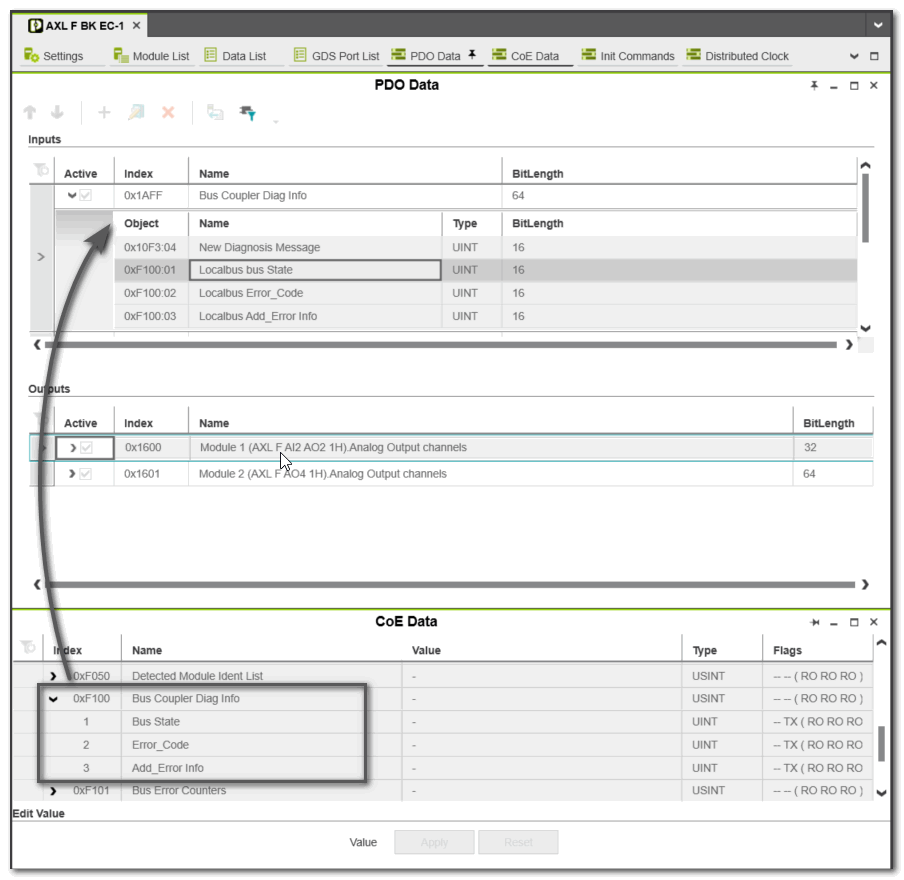
Example: The object 'Bus Coupler Diag Info' (index 0xF100 in the object dictionary) is mapped in the PDO 'Bus Coupler Diag Info' of bus coupler 'AXL F BK EC-1' which is received by the master from the slave.