Identification and HotConnect of Slaves
This topic contains the following sections:
Addressing in EtherCAT networks
Auto-increment addresses: While there is no EtherCAT network configuration (ENI) available on the EtherCAT master, each slave device automatically gets a physical address during EtherCAT startup according to its position in the network and the order in which it is detected (auto-increment addresses).
Station address: After configuring the EtherCAT network in PLCnext Engineer, an ENI is available. After writing the configuration to the master, the master writes this network configuration to the slaves. As a result, the auto-increment slave addresses are overwritten by logical addresses which are also referred to as station address (numerical value between 1 and 65535). The station address does not necessarily depend on the physical address (i.e., network position) of the slave. Instead, it can be assigned in the 'Settings' of each slave. During operation, each slave is addressed by this station address.
Evaluating only the station address alone can lead to application errors: Slaves can be uniquely addressed in the network using their station address, as each slave is stored in the ENI with its 'Identity' data (vendor, product name, version, model code, etc. as shown in the 'Settings' editor of the slave) and the assigned station address. The master checks whether the slave actually found matches the information in the ENI.
However, if identical slave types are used in a network, there is a risk that if the network topology (slave sequence) has been changed (e.g. due to incorrect cabling), an identical slave type but with a different application function will be addressed at the stored station address. To avoid this, slaves offer one or more additional device identification modes, which are described in the following section.
Identification Modes in EtherCAT networks
The way in which a slave is identified by the master can be defined in the slave settings. Double-click the slave to be configured and open its 'Settings' editor. The identification modes the slave supports can be selected from the 'Mode' list box in the 'Identification' editor section.
Example: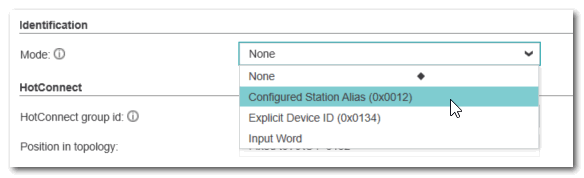
The different settings offer varying degrees of protection against unintentional changes to the slave sequence in the network (e.g. by incorrectly plugging in the EtherCAT cabling). Depending on the setting of the slave parameter 'Identification Mode', the master checks in different ways (more or less rigidly) whether it is addressing the correct slave at the given address.
Identification in EtherCAT networks is also referred to as Device Recognition.
The following Identification Modes are defined. Which modes are actually supported depends on the slave:
| Note
Greater protection against misconfiguration by selecting an identification mode higher than 'None' is particularly important for changing network configurations, e.g. with HotConnect (see section below). |
| Identification Mode | Description | How to configure in PLCnext Engineer | System behavior |
|---|---|---|---|
| None | No identification check takes place. | n/a | The slave is addressed under the station address stored in the ENI. This means that there is no increased protection in the event of topology errors (for example, due to identical slave types at the wrong bus position). |
| Configured Station Alias | The station alias is an optional identification value in addition to the station address to uniquely identify the slave in the network. It can be used to implement greater protection against topology errors. If the slave used supports station alias and Explicit Device ID, both features cannot be used at the same time.The station alias is stored in the ESC Configured Station Alias (0x0012) register when the power supply is switched on.The EtherCAT Group also refers to the station alias as the Second Slave Address (SSA). | The way, the station alias has to be configured differs depending on the device type.Refer to the Technical Manual of your slave device type for information how to setup the station alias.This station alias value configured for the device must be entered in the 'Settings' editor, section 'Identification', field 'Value'. This value is then stored in the network configuration. Value range: 0 to 65536 | During device startup, the ESC (EtherCAT Slave Controller) loads this address into its register 0x0012, from where it can be read by the EtherCAT master.The master uses auto-increment addressing to read the station aliases of the configured slaves. It then compares the detected station aliases with the network configuration to get the topology that was set as the network topology.If this comparison shows differences, EtherCAT communication is not established and an error is output. To rectify the error, evaluate the error message and use the 'Mismatch Analyzer' in the 'Online Functions'. |
| Explicit Device ID | The Explicit Device ID is an optional identification value in addition to the station address to uniquely identify the slave in the network. It is the latest type of device identification (according to ETG 1020 standard, 01.2016), which is usually faster than identification via station alias. Like the station alias, it can be used to implement greater protection against topology errors. If the slave used supports Explicit Device ID and station alias, both features cannot be used at the same time. The value is stored in the ESC register (0x0134). | The way, the Explicit Device ID has to be configured differs depending on the device type. Refer to the Technical Manual of your slave device type for information how to setup the Explicit Device ID.This Explicit Device ID value configured for the device must be entered in the 'Settings' editor, section 'Identification', field 'Value'. This value is then stored in the network configuration. The value range depends on the device type. | The ESC (EtherCAT Slave Controller) loads this address into its register 0x0134, from where it can be read by the EtherCAT master.The master uses auto-increment addressing to read the Explicit Device IDs of the configured slaves. It then compares the detected Explicit Device IDs with the network configuration to get the topology that was set as the network topology.If this comparison shows differences, EtherCAT communication is not established and an error is output. To rectify the error, evaluate the error message and use the 'Mismatch Analyzer' in the 'Online Functions'. |
| Input Word | A bit sequence which corresponds to the station address (0...65,535) is stored in the process data area of the slave. This value is interpreted by the master as the station address. | This identification mode is not supported by all devices.Consult the technical manual of your device for more information.Enter the 'Offset' address where the identification value is to be stored in the process data area of the slave. Enter the station address of the device as 'Value'. | Using the 'Offset' value specified in the editor, the EtherCAT master is informed of the storage location via the ESI description. The master then compares the detected identification word entered in the 'Value' field with the expected value.If this comparison shows differences, EtherCAT communication is not established and an error is output. To rectify the error, evaluate the error message and use the 'Mismatch Analyzer' in the 'Online Functions'. |
HotConnect
In a “normal” EtherCAT network, the topology is clearly configured, which means that the order and network position of the slaves is normally fixed. With HotConnect, however, the network topology can be adapted dynamically. Therefore, the HotConnect function enables flexible topologies, which is useful if the application requires frequent topology changes or if slave devices are not available or need to be replaced frequently during commissioning.
Once HotConnect has been activated in the master 'Settings', the master automatically recognizes the new configuration after slaves have been added or removed. Slaves assigned to a HotConnect group can easily be removed from or added to the EtherCAT data traffic. The master can immediately integrate new participants or correctly delete removed/disconnected slaves without disrupting the communication of the other devices. Topology modifications are possible before the start or during operation of the EtherCAT system. Slaves can be added/removed by connecting/disconnecting the communication line, switching the devices off/on or by other means.
After slaves have been connected to a HotConnect group, the master carries out the commissioning of the slaves: It establishes the Ethernet link, parameterizes the devices and then performs the EtherCAT boot sequence (state transitions from INIT to OP). If configured, finally the Distributed Clocks synchronization follows. This process, from identification to operation of the slaves in the HotConnect group, can take up to several seconds depending on the position.
The prerequisites for this function are that the EtherCAT master supports the HotConnect function and that the EtherCAT slaves are HotConnect-capable.
Current implementation in iCube Control- iCube Control currently supports HotConnect groups of the type Floating with exactly one slave per group.
- Currently no HotConnect groups can be defined manually and it is not possible to assign a second slave to a group by specifying an existing group ID.
- When activating HotConnect in the master 'Settings', each slave automatically obtains a group ID which corresponds to the 'Identification Value'.
- Double-click the 'EtherCAT' node in the PLANT (which represents the master).
- In the editor area, click the 'Settings' editor tab.
- In the 'General' section of the editor, active the checkbox 'Create HC Group for Slaves'.
- Now, each slave automatically obtains a group ID which corresponds to the 'Identification Value'. This group ID value appears in the slave 'Settings', section 'HotConnect', field 'HotConnect group ID'. The group ID of each slave can be edited. However, the ID must be unique within the EtherCAT network (i.e., PLCnext Engineer project). As currently only one slave is supported per group and no other slaves can be assigned to a group by editing the slave's group ID, editing is not necessary.
| Note
HotConnect and Identification Mode: If slaves belong to a HotConnect group, setting an 'Identification Mode' other then 'None' is of particular importance: The Station Alias or Explicit Device ID helps to clearly assign and uniquely identify the devices, even if they are plugged in different positions. When a HotConnect segment is plugged in, the EtherCAT master recognizes the new slave and can immediately identify it in the HotConnect segment, even if it is not in its original position in the network. If the EtherCAT master cannot detect a valid address in a hot connected slave station, the slave will not be accepted into the process data traffic. This ensures that the network configuration remains correct and the system continues to function seamlessly - without a restart. |