Excluding Components from Build
This topic contains the following sections:
- General information
- Excluding code worksheets from build
- Excluding tasks and program instances from build
- Excluding network masters and children nodes from build
General information
You can exclude components when you build your project. Excluded components will not be compiled by the compiler during the build process. The exclude from build option is available for code worksheets of a POU, tasks and program instances, and network masters and its children devices. For example, for an FB POU where all worksheets are excluded from the build process, the FB POU and its formal parameters are part of the project image but not its code.
Excluding code worksheets from build
The following applies for excluded code worksheets in online and offline mode:
- The editor tabs of code worksheets are displayed strikedthrough (applies to offline and online mode).
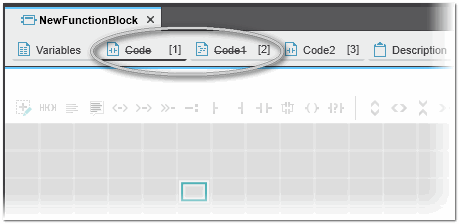
- Code worksheets are shown read-only (grey background). Editing is not possible.
- Excluded code worksheets are displayed strikedthrough in the 'Print' dialog and also in the printout.
- In online mode, no online variables are shown for the excluded worksheets.
- In online mode, dragging and dropping variables to the WATCHES window, LOGIC ANALYZER window etc. is not possible.
- A POU with an excluded code worksheet can be released in a library. When using this POU from a released library in a project, the code worksheet is deactivated.
- Code worksheets from a library cannot be excluded from compilation.
- Code worksheets of a Safety PLC or safety-related devices cannot be excluded from compilation.
How to exclude worksheets from build process
The context menu of the code worksheet's editor tab provides the following commands to exclude a single worksheet or all worksheets of the POU from the build process:
| Command | Description |
|---|---|
| 'Exclude from Build' | Excludes the selected code worksheet from the build process. The editor tab is displayed strikedthrough and the worksheet is in read-only mode. |
| 'Deactivate Build of all Code Worksheets' | Excludes all code worksheets of the POU from the build process. All editor tabs of the code worksheets are displayed strikedthrough and the worksheets are in read-only mode. The command is not available if all worksheets are already deactivated. |
| 'Activate Build of all Code Worksheets' | Activates the build of all code worksheets of the POU for the build process. The command is not available if all worksheets are already activated. |
Excluding tasks and program instances from build
When excluding tasks and program instances from the build, note the following:
- There will be no code generated for the tasks and program instances.
- You can select a single program instance to exclude from the build, or select a task with all its assigned program instances to exclude from the build.
- Excluded tasks and program instances are marked strikedthrough in the PLANT area.
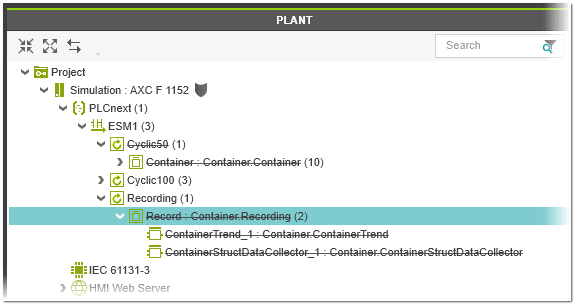
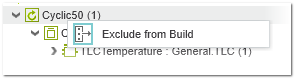
You can exclude a single program instance or a task with its assigned program instances from the build using the 'Exclude from Build' command in the context menu of the corresponding PLANT node. When activated, the command entry is active and marked with a colored frame around the icon.
Excluding network masters and children nodes from build
When excluding network masters and children nodes from the build, note the following:
- For an excluded component, there is no output generated for the corresponding protocol/device.
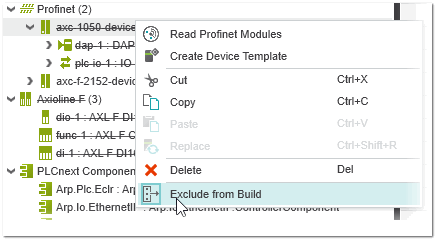
- The excluded device and master (and its children) are marked strikedthrough in the PLANT area. When excluding the master from the build, all its children nodes are excluded. Excluded devices will stay excluded after re-including the master.
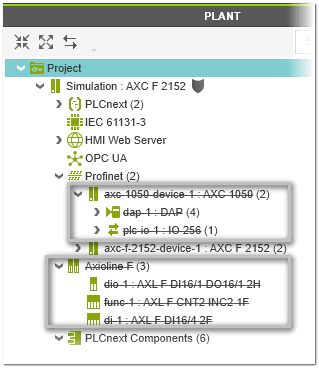
- For Axioline, EtherCAT, and Interbus: Only the protocol master can be excluded. Individual devices cannot be excluded. Excluding the master excludes the entire protocol from the build.
- For Profinet and Modbus: Both the protocol master and individual devices can be excluded. If the master is excluded, all its children nodes are excluded. Likewise, excluding a bus coupler implicitly excludes all of its modules and submodules.
- It is not possible to exclude a device if it contains a safety-related submodule.
You can exclude a master or device from the build using the 'Exclude from Build' command in the context menu of the corresponding node. When activated, the command entry is active and marked with a colored frame around the icon.