EtherCAT Slave Device Node
Preconditions for using EtherCAT
| Note
Refer to the PLCnext Info Center for a list of controllers supporting EtherCAT. |
| Note
The EtherCAT application needs to be installed on PLCnext Technology controllers via the PLCnext Store. |
The EtherCAT functionality and therefore also the EtherCAT-related PLANT nodes and editors are only available if the controller supports this (PLCnext Technology controllers from firmware version 2026.0) and the functionality has been activated in PLCnext Engineer. To do this, proceed as follows:
- Double-click on the controller node in the PLANT and open the 'Settings' editor.
- In the 'Extensions' category, set the 'EtherCAT' parameter to 'On'.
 Example illustration: How to activate EtherCAT functionality

Editor description
The following information refers to a specific, typical device type. Your screen may differ.
EtherCAT slave devices are child elements of the 'EtherCAT' node (which represents the EtherCAT Master). All editors for setting up and configuring an EtherCAT slave device are accessible by double-clicking its PLANT tree node under the 'EtherCAT' node.
Example of an EtherCAT slave device in the PLANT
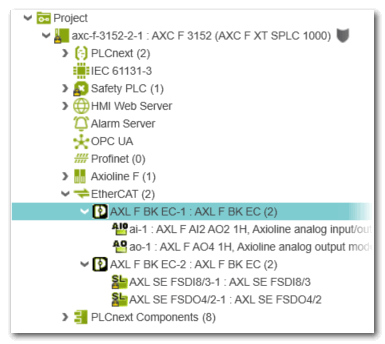
The node of an EtherCAT slave device in the PLANT may provide the following editors:
| Note
Which editors are available for a slave depends on the version of the device and whether the device supports the corresponding functionality. |
| Further Info
Detailed information on the EtherCAT configuration as well as step-by-step procedures can be found in the help chapter "EtherCAT-specific Properties". |