'Online Functions' Editor (EtherCAT Master)
The following information refers to a specific, typical device type. Your screen may differ.
This help topic describes the 'Online Functions' editor of the 'EtherCAT' PLANT node (which represents the EtherCAT Master). The online functions are used to determine the current state of the EtherCAT network in a simple way. Information about the components involved as well as about the communication between the nodes is retrieved from the network and displayed in various editor tabs. Thus, the available editors allow a detailed diagnosis.
To use the EtherCAT online functions, it is not required that the PLANT tree represents (models) the EtherCAT topology in PLCnext Engineer. This means, the structure of the PLANT in PLCnext Engineer may differ from the actually connected EtherCAT network. However, the controller must be connected to PLCnext Engineer.
This topic contains the following sections:
- Structure of the EtherCAT Online Functions editor
- Online EtherCAT bus scan
- Editor tabs for the EtherCAT Master and slave devices
Structure of the EtherCAT Online Functions editor
On the left, the found EtherCAT network nodes are listed. An LED-like icon symbolizes the current state of the node.
The colors of this icon corresponds to the color of the state icon displayed on the right (in the editor section 'State Machine'):
Red = Init or Bootstrap, blue = Pre-Op, yellow = Safe-Op and green = Op.
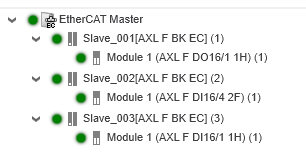
The information displayed in the tab on the right and the operations you perform there relate to the EtherCAT node selected in the tree.
Online EtherCAT bus scan
Above the tree that shows the EtherCAT network, the 'Refresh EtherCAT online functions' icon is located. If the controller is connected to PLCnext Engineer, clicking on the icon causes the bus to be scanned. All connected and detected slave devices are then listed in the tree. Further information can be found in the topic "Diagnostics of the EtherCAT Master/Slaves", section "Online Bus Scan".
| Note
In the tree that displays the scan result, the naming for each device is as follows: <auto generated name> [<Product reference>] (<station address>) |
Editor tabs for the EtherCAT Master and slave devices
On the right side, several editor tabs are visible, depending on which node is selected in the tree on the left (EtherCAT master or slave):
- 'General' tab (available for the master and slaves)
- 'CoE Data' tab (available for the master and slaves)
- 'Mismatch Analyzer' tab (only available for the master)
- 'History' tab (only available for the master)
- 'Extended Diagnostics' tab (only available for slaves)
- 'DC Diagnostics' tab (only available for slaves)
- 'FoE' tab (only available for slaves)
- 'EEPROM' tab (only available for slaves)
- 'ESC Register' tab (only available for slaves)