Defining Data Sets to be Published
This topic contains the following sections:
- What is a data set?
- Which ports/variables can be included in a data set?
- How to add a new data set
- How to add ports/variables to a data set
- How to delete data sets or elements from a data set
- Next steps
What is a data set?
Ports and variables to be published into the network are organized as so-called data set. Or said the other way around: a data set is a collection of publishable ports/variables.
After defining a data set as described here, it can be selected in the properties of each writer (publisher) defined in the project. This way, data sets are reusable, i.e. the items contained in a data set can be published in different contexts/intervals or to different network addresses (connections).
Which ports/variables can be included in a data set?
The following items can be included into a data set and therefore published by any writer configured in the project:- OUT ports (no IN ports).
- Resource-global IEC variables (no locals, program-globals or In/Out variables).
- Elementary data types and one-dimensional array of an elementary type.
How to add a new data set
| Note
In addition to manually adding a new data set as described in the following procedure, you can also import a data set assigned to a reader or writer group from an external PubSub configuration of a remote OPC UA server. See the topic "Importing External PubSub Configurations from Remote Servers" for details. |
- Double-click the 'OPC UA' PLANT tree node and open the 'PubSub' editor.
- In the tree on the left, mark 'Published data sets'.
- In the editor on the right, click into the 'Name' field of the lowest, empty table row.
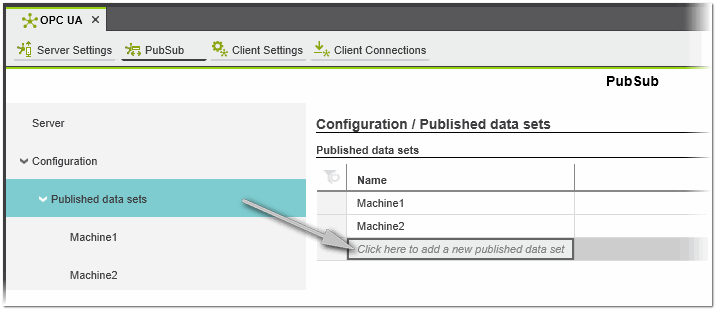 A new data set with a default name is added.
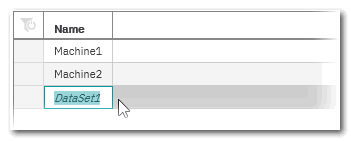 Click anywhere into the grid to accept the default name or edit it and press <Enter>.
Note
The data set will later be referenced by its name when configuring the writers. It is therefore recommended to define a meaningful name and not to change it afterwards. - Continue with the selection of ports/variables for this data set.
How to add ports/variables to a data set
- In the tree on the left, open the 'Published data sets' folder and select the required data set.
- In the 'Variables' table on the right, click into the 'Click here to add...' field, and select a port/variable from the drop-down list. The drop-down list contains all OUT ports and global IEC variables defined in the current project.
As mentioned above, elementary data types and one-dimensional arrays of an elementary data type are supported.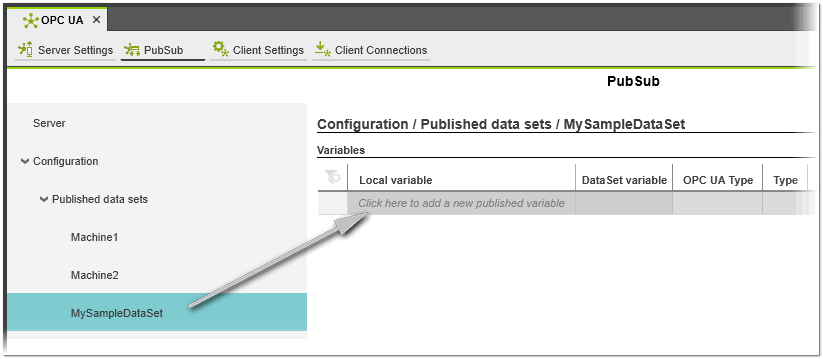 When adding a port/variable, the 'OPC UA Type' (built-in data type acc. to the OPC UA specification) and 'Type' columns are automatically filled (both values are read-only). The 'Type' column shows the data type of the selected variable declared in the project. The 'OPC UA Type' shows the OPC UA data type used by the server to store the value of the variable. The optional 'DataSet variable' value is used as published alias name of the local project variable.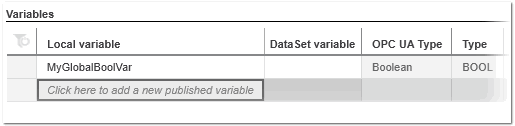
Note
The order in which ports and variables are inserted/listed in a data set is important for all subscribers that will read this data set: When configuring a reader, the local variables must be created in exactly this order with the correct data types. Otherwise, the mapping between received values and local variables will not be correct.
Since the configuration of publishers and the subscribers takes place in different projects, there can be no automatic check for this. As a user, you must ensure that the necessary information is available when configuring the subscribers.
You can modify the order of inserted variables by dragging & dropping them within the table: click and hold an entry in the row header.Note
The 'OPC' attribute in POU variables tables is not relevant in this context. Ports and global variables can be added to a data set even if the checkbox is not selected in the declaration.
How to delete data sets or elements from a data set
The deletion of entries is possible in the 'Published data sets' table and in the 'Variables' table of a data set.
- Left-click into the table row to be deleted.
Multi-selection can be done by pressing the <Ctrl> key or <Shift> key while clicking on the desired table lines. <Ctrl> + <A> selects all table lines. - Press the <Del> key.
Next steps
 Configure connections for publishing/subscribing
Add writers (publishers) to a connection
and assign data sets to a defined writer
Add readers (subscribers) to a connection
and map target (local) variables to the variables read from a publisher